For those of you that have "had it" with Windows Vista. PC Magazine has posted instructions that will take you step by step through the process of downgrading from Vista to XP.
How to Downgrade from Vista to XP
As for me? I'll stick with Vista for now.
Showing posts with label Vista. Show all posts
Showing posts with label Vista. Show all posts
Friday, May 23, 2008


Friday, April 25, 2008
*Warning* Multiply owned object
Since I'm already having to use this in Civil 3D 2009, I'm going to post it here so it's easier for me and others to find in the future.
Isn't it frustrating when you get this type of warning message?
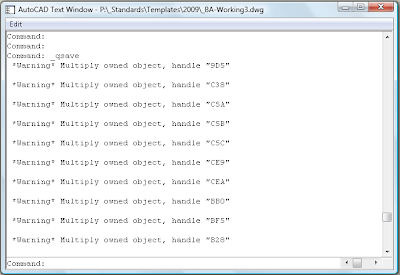
Great. Now what do I do? Is the drawing corrupt? Do I have to start from scratch?
Some discussion forum posts suggest that wblocking the drawing can help. Yes, it does get rid of the warning messages, but you could lose all your styles, object layer settings, defaults, etc. That's not acceptable.
Well, according to Scott's Superman post, there is a command you can type to get rid of the problem object (Replace C5C with the handle shown in your command line):
(entdel (handent "C5C"))
Since it is possible to lose a style or two by running this command, I'd like to know what I'm deleting. So after a bit more research, I found a link to Shaan Hurley's post about DbView for AutoCAD 2007. I followed the instructions and ran the program. It works with Civil 3D 2009. I only wish someone could a "delete" command button for the selected object.
Here's a few screen captures of the DbView program in action:
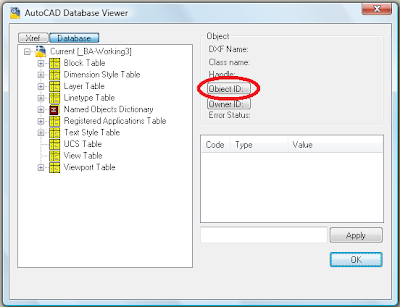
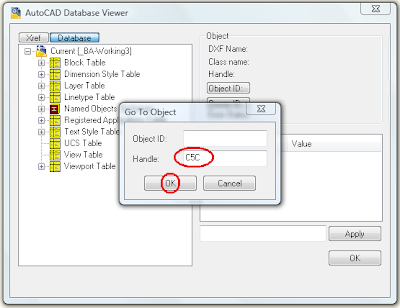
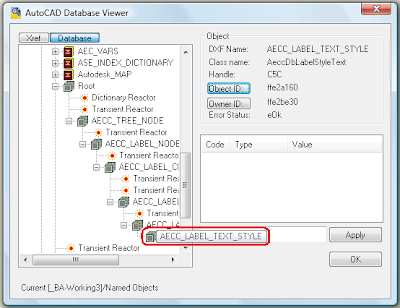
At this point, I would love to give you some great and wonderful insight as to what you're seeing in that last image. Unfortunately, for now all I can do is look at it and see what type of object will be deleted.
As far as deleting the object goes there are several options for running the command from Scott's post.
 It seems to me that every time I've seen this warning message, it's always been when I have been dragging styles between drawings. In Civil 3D, it definitely happens when you drag child styles into a drawing that already contains the parent style. This happens even if the parent styles were just created by dragging them from the same drawing. Hopefully it can be fixed with C3D 2009 SP1.
Isn't it frustrating when you get this type of warning message?

Great. Now what do I do? Is the drawing corrupt? Do I have to start from scratch?
Some discussion forum posts suggest that wblocking the drawing can help. Yes, it does get rid of the warning messages, but you could lose all your styles, object layer settings, defaults, etc. That's not acceptable.
Well, according to Scott's Superman post, there is a command you can type to get rid of the problem object (Replace C5C with the handle shown in your command line):
(entdel (handent "C5C"))
Since it is possible to lose a style or two by running this command, I'd like to know what I'm deleting. So after a bit more research, I found a link to Shaan Hurley's post about DbView for AutoCAD 2007. I followed the instructions and ran the program. It works with Civil 3D 2009. I only wish someone could a "delete" command button for the selected object.
Here's a few screen captures of the DbView program in action:


At this point, I would love to give you some great and wonderful insight as to what you're seeing in that last image. Unfortunately, for now all I can do is look at it and see what type of object will be deleted.
As far as deleting the object goes there are several options for running the command from Scott's post.
- You could edit the handle number in a text document, then paste it into the command line.
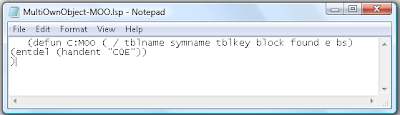
- You could also create a script file on your desktop. Then you would just edit the handle in the script file, save and close, then drag and drop the script file into AutoCAD. You'll need to either put a space after the final )) or make sure and add a return after the final )) in the script file or you'll have to hit enter after running the script file.
- Running this command through a lisp routine is another option.
 It seems to me that every time I've seen this warning message, it's always been when I have been dragging styles between drawings. In Civil 3D, it definitely happens when you drag child styles into a drawing that already contains the parent style. This happens even if the parent styles were just created by dragging them from the same drawing. Hopefully it can be fixed with C3D 2009 SP1.
Friday, February 15, 2008
Vista, You're Fast Again!
As a follow up to my Vista, Why Are You So Slow? post, I finally just changed my "Windows Color and Appearance" to Vista Basic. That helped on the speed issue a lot, but then my screen captures didn't match all the prior screen captures that I had in the handout I was preparing. So I just switched it back to the default settings for "Windows Color and Appearance". Even though I don't know why, the system is "fast" again. I guess the change worked like a reboot or something.
So if you ever have slowness issues with Vista, try switching to Vista Basic in the "Open classic appearance properties for more color options" section of the "Windows Color and Appearance" panel in Vista, then change back to the Aero color of your choice.
Technorati Tags: Windows,, Vista
Sunday, February 10, 2008
Vista, Why Are You So Slow?
I've been using 32-bit Vista Home Premium for several months now. The speed has been good for the most part but for the last week or two, I had noticed everything running quite sluggish. I didn't know what I had done different. The sluggishness even appeared while I was typing things like emails or web posts. What the heck happened to this laptop?
I began searching for culprits by going through the icons shown on the taskbar. I had installed a trial version of SnagIt several days earlier and it started automatically when booted the machine. I exited SnagIt but that didn't seem to help. The sluggishness was still there.
My laptop is an HP and as a result, it has several HP apps running as well. I had already removed or disabled several other HP apps, but HP Advisor was still running. I closed the HP Advisor, but still noticed no improvement.
Then I saw this icon that belonged to OneNote. What was it doing there? Supposedly it was ready and waiting for me to begin creating notes like for the minutes of a meeting or notes from a class I was attending. I didn't ask it to be there, so I'll just exit that program as well. Unfortunately, no exit option was available. I could hide the icon (like that was going to do a whole lot of good). I had to find where this program originated.
So I went to check what services were being started automatically. It wasn't there either. So where the heck was it? I found that it was a shortcut was called "OneNote 2007 Screen Clipper and Launcher" and it was in this folder:
C:\Users\Internet\AppData\Roaming\Microsoft\Windows\Start Menu\Programs\Startup
I removed it and rebooted. Although that did improve the speed a bit, the laptop is still not as fast as it was previously.
I continued to search for additional culprits and felt that the indexing service of Vista was probably involved. I found several websites that discussed different Windows Vista tweaks. Here is one that discussed tweaking the indexing options of Vista.
http://www.vistaultimate.com/tweak-windows-vista-indexing.htm
I made this tweak and even while typing this post (I haven't restarted the laptop yet) I've already noticed a difference. There is no longer a lag between when I type something and when the characters actually appear on the screen.
So is there a bad side to not indexing? I don't know yet, but I do know that the index list hardly ever was indexing the folder or file types for which I ran searches. Now at least there is a shorter file list to browse before I can tell it to "search in non-indexed directories".
Now the indexing wasn't changed within the last two weeks, so there was still an issue. Then I remembered. One of the first things I did when I got this laptop was to uninstall Microsoft Works and install Open Office. I was really going to give Open Office a try and see if I could live without Microsoft Office. I already knew I wouldn't use Works because too many Excel commands that I use often are either different or missing. Well, I gave it a try and although the other portions of Open Office would have been sufficient, I had trouble with Excel again. I guess the "power user" in me appeared and just found problem after problem with using the Open Office replacement for Excel. For most people it worked fine, but some things I just couldn't accept.
So I finally conceded and purchased a legal copy of Microsoft Office Home and Student 2007, but I didn't install it quite yet. I figured, what the heck, I'll go ahead and use the trial version of Office on my laptop before I open the newly purchased product. If I didn't like it or if I had similar problems as I did with Microsoft Works, I would just return it unopened. Now that I look back, I see this as the time when the laptop began its descent into the land of the slugs.
In summary, can I live without Microsoft's version of Excel? Yes.
Will I use other spreadsheets in place of Microsoft's version of Excel? No.
I guess I'll just have to live with that performance hit to continue using Excel the way I want.
Maybe Vista SP1 will take care of this. Well, just in case, I'm not going to expect too much.
I began searching for culprits by going through the icons shown on the taskbar. I had installed a trial version of SnagIt several days earlier and it started automatically when booted the machine. I exited SnagIt but that didn't seem to help. The sluggishness was still there.
My laptop is an HP and as a result, it has several HP apps running as well. I had already removed or disabled several other HP apps, but HP Advisor was still running. I closed the HP Advisor, but still noticed no improvement.
Then I saw this icon that belonged to OneNote. What was it doing there? Supposedly it was ready and waiting for me to begin creating notes like for the minutes of a meeting or notes from a class I was attending. I didn't ask it to be there, so I'll just exit that program as well. Unfortunately, no exit option was available. I could hide the icon (like that was going to do a whole lot of good). I had to find where this program originated.
So I went to check what services were being started automatically. It wasn't there either. So where the heck was it? I found that it was a shortcut was called "OneNote 2007 Screen Clipper and Launcher" and it was in this folder:
C:\Users\Internet\AppData\Roaming\Microsoft\Windows\Start Menu\Programs\Startup
I removed it and rebooted. Although that did improve the speed a bit, the laptop is still not as fast as it was previously.
I continued to search for additional culprits and felt that the indexing service of Vista was probably involved. I found several websites that discussed different Windows Vista tweaks. Here is one that discussed tweaking the indexing options of Vista.
http://www.vistaultimate.com/tweak-windows-vista-indexing.htm
I made this tweak and even while typing this post (I haven't restarted the laptop yet) I've already noticed a difference. There is no longer a lag between when I type something and when the characters actually appear on the screen.
So is there a bad side to not indexing? I don't know yet, but I do know that the index list hardly ever was indexing the folder or file types for which I ran searches. Now at least there is a shorter file list to browse before I can tell it to "search in non-indexed directories".
Now the indexing wasn't changed within the last two weeks, so there was still an issue. Then I remembered. One of the first things I did when I got this laptop was to uninstall Microsoft Works and install Open Office. I was really going to give Open Office a try and see if I could live without Microsoft Office. I already knew I wouldn't use Works because too many Excel commands that I use often are either different or missing. Well, I gave it a try and although the other portions of Open Office would have been sufficient, I had trouble with Excel again. I guess the "power user" in me appeared and just found problem after problem with using the Open Office replacement for Excel. For most people it worked fine, but some things I just couldn't accept.
So I finally conceded and purchased a legal copy of Microsoft Office Home and Student 2007, but I didn't install it quite yet. I figured, what the heck, I'll go ahead and use the trial version of Office on my laptop before I open the newly purchased product. If I didn't like it or if I had similar problems as I did with Microsoft Works, I would just return it unopened. Now that I look back, I see this as the time when the laptop began its descent into the land of the slugs.
In summary, can I live without Microsoft's version of Excel? Yes.
Will I use other spreadsheets in place of Microsoft's version of Excel? No.
I guess I'll just have to live with that performance hit to continue using Excel the way I want.
Maybe Vista SP1 will take care of this. Well, just in case, I'm not going to expect too much.
Subscribe to:
Posts (Atom)